 uni-msg
Bulk messaging
Bulk WhatsApp Sender
Send the same message to a whole list from your own number — no Meta Business approval, no new business number, no template review. Link the number you already use and the first batch can go out in about two minutes.
- ~2 min
- to link a number
- 10-60 s
- randomised gap
- 0
- Meta forms to file
- CSV
- in, merged out
How to send bulk messages on WhatsApp
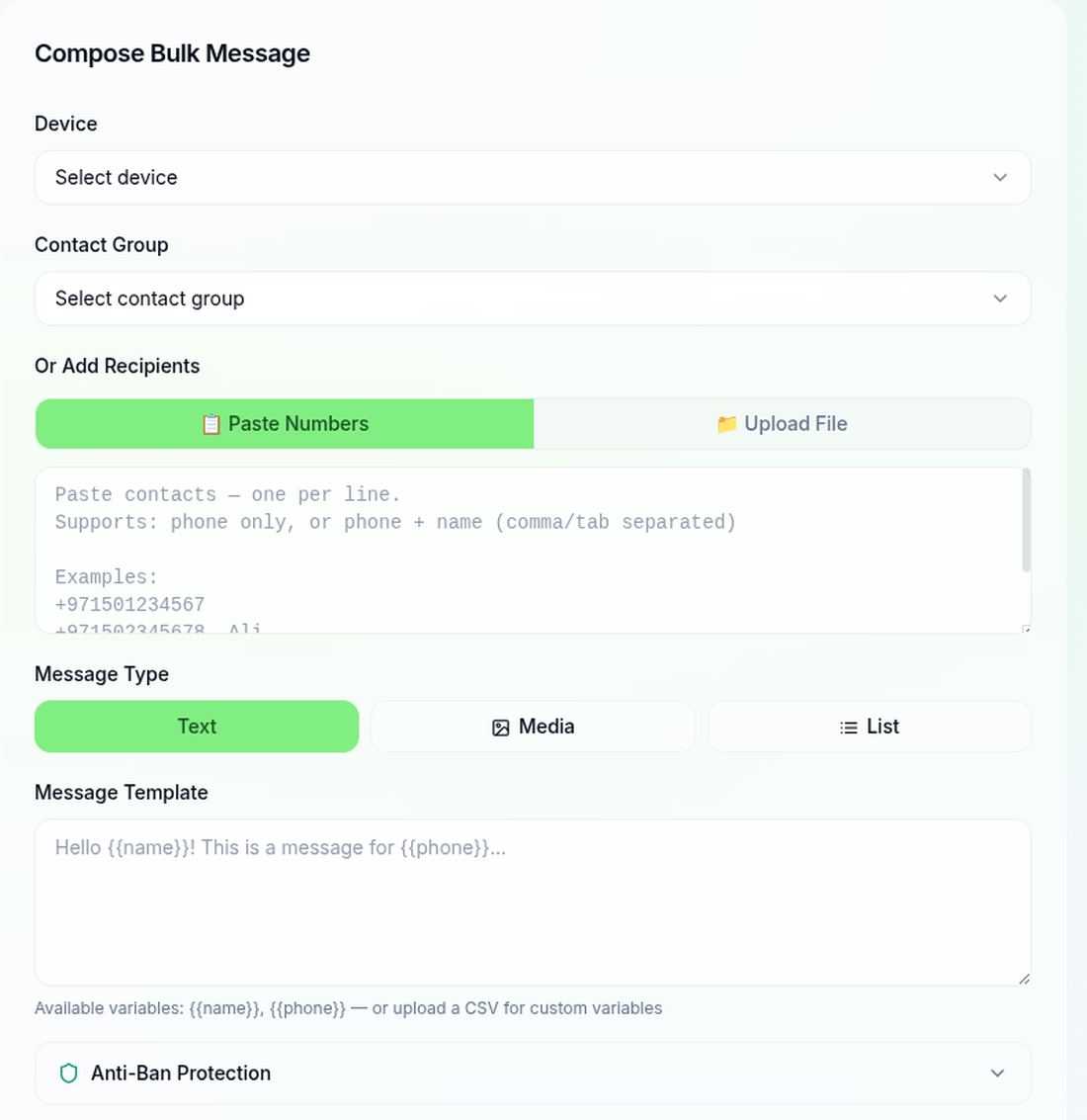
Four steps. Everything runs in the browser against a hosted service you sign into — there is nothing to install and nothing to keep running on your machine.
- 1
Link your number
Open Dashboard → Devices and scan the QR with WhatsApp → Linked devices, exactly as you would for WhatsApp Web. A pairing code works too if the camera is awkward. Your phone stays linked and your existing chats are untouched.
- 2
Import your contacts
Upload a CSV or Excel file. Every column is mapped to a field, numbers are normalised, and any number already in your list is skipped rather than duplicated — the import tells you how many were created and how many were skipped.
- 3
Compose with merge fields
Write one message and drop your columns into it as {{first_name}} or {{city}}. The preview renders against a real row, so you see what an actual recipient will see before anything sends.
- 4
Send, then watch it land
Messages leave one at a time on a randomised gap rather than all at once. Each row carries its own delivery status, and any reply arrives in the shared inbox against that contact.
What actually gets numbers banned — and what we do about it
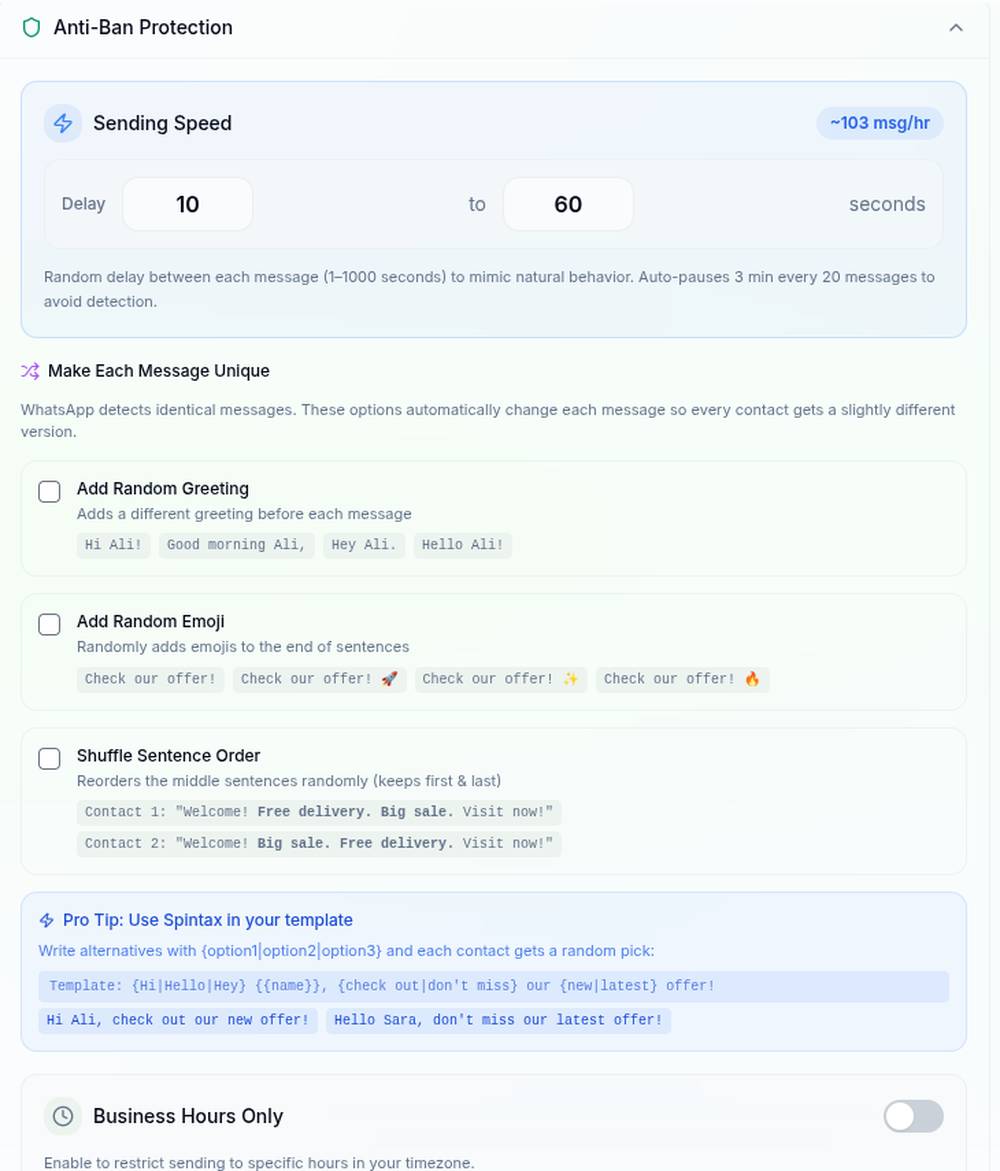
This is the part most tools skip. WhatsApp does not restrict numbers for sending in bulk; it restricts them for sending fast, sending identical text to strangers, and getting reported. The pacing below is on by default and the ceiling cannot be raised.
A new number is not allowed to act like an old one
The daily ceiling is derived from how long the number has been linked, not from your plan. Buying a bigger plan does not buy a faster ramp.
- Days 1-3
- 10/day
- Days 4-7
- 30/day
- Days 8-14
- 50/day
- Days 15-30
- 100/day
- Day 31+
- 200/day
Where we will not help
If the list was bought, scraped, or collected without consent, pacing will not save the number — it only changes how long it takes to get reported. There is no setting here for sending to strangers at volume, and that is deliberate.
The longer version, including the signals WhatsApp appears to weigh and how to recover a restricted number, is in how to avoid a WhatsApp ban.
One message in, a different message per person out
Merge fields are not decoration. Identical text sent to many people is one of the strongest spam signals there is, so personalisation protects the number as well as the reply rate.
Your spreadsheet
| phone | first_name | city |
|---|---|---|
| +971 50 123 4567 | Layla | Dubai |
| +92 309 824 9514 | Awais | Lahore |
| +44 7700 900112 | Tom | Leeds |
What you write once
Hi {{first_name}} — our {{city}} showroom opens Saturday. Want me to hold a slot?What each person receives
CSV and Excel
Upload the file you already have. Columns become fields; you map them once.
Tags and groups
Send to a segment rather than the whole list — tag on import or from the contact record.
Dedupe on import
A number already in your contacts is skipped, not added twice. The import reports created and skipped.
Track delivery and replies
Every message carries its own state, so a batch is never just a total. Read receipts follow whatever the recipient has enabled on their side — if they have turned them off, delivery is the last state you will see, and we do not pretend otherwise.
Replies land in one inbox
When someone answers, the reply arrives in the shared inbox against that contact, with the message you sent above it. A campaign that starts a hundred conversations does not turn into a hundred places to look.
The limits, stated plainly
Worth reading before you buy rather than after.
| Gap between messages | 10-60 seconds by default, randomised every time. Adjustable from 1 to 1000 seconds. |
| Batch pause | Three minutes after every 20 messages. |
| Daily ceiling per number | 10 on day one, rising to 200 after about a month linked. |
| Over the day quota | Queued, not dropped. It goes out after midnight UTC. |
| Free plan | 50 messages a month, one number, no credit card. |
| Failures | Shown per recipient. They do not consume your allowance. |
| What this is not | Not the official Meta Business API. It links as a companion device. |
Pricing
The free plan is a real plan, not a trial that expires. It is capped at 50 messages a month so you can send to a real list before deciding.
Free
$0 no credit card
- ✓1 number
- ✓50 messages / month
- ✓CSV import and merge fields
- ✓Delivery and read status
Pro
Popular$19 per month
- ✓1 number
- ✓Unlimited messages
- ✓Groups and communities
- ✓3-day free trial
Every plan is billed monthly and can be cancelled from the dashboard. Full plan comparison is on the pricing section of the home page.
Questions people actually ask
Is bulk sending on WhatsApp allowed?+
Sending to people who gave you their number and expect to hear from you is ordinary use. What WhatsApp acts against is unsolicited messaging at speed: identical text fired at strangers, hundreds per hour, from a number with no history. The pacing described on this page exists to keep you on the right side of that line. If your list is bought or scraped, no tool will keep the number safe and we would rather you did not start.
Will my number get banned?+
The risk is real and it is mostly driven by how you send, not by which tool you use. Numbers get restricted for sending too fast, sending identical text to many strangers, and being reported as spam. uni-msg paces every send with a randomised 10 to 60 second gap — about 103 messages an hour — pauses for three minutes after each batch of 20, and caps a new number at 10 messages a day until it has been active for a while. You can lower those numbers but not raise them past the cap.
Do I need Meta Business API approval?+
No. Your number links to uni-msg as a companion device, the same mechanism WhatsApp Web uses. There is no business verification, no template review and no provider contract. The trade-off is that this is not an official Meta integration, so throughput is deliberately paced rather than unlimited.
How many messages can I send?+
A brand new number starts at 10 a day and ramps to 200 a day after about a month of steady use. That ceiling is per number — connect more numbers and each has its own ramp. Anything you queue beyond the day quota is not dropped; it waits and goes out after midnight UTC.
Can I personalise each message?+
Yes. Import a CSV and every column becomes a merge field you can drop into the message as {{first_name}}, {{city}} or anything else you named. Each recipient gets their own rendered text, which also means no two messages are byte-identical — that matters for both results and safety.
Is there a free plan?+
Yes. The free plan is 50 messages a month on one number with no credit card. It exists so you can send a real batch to a real list before paying. Paid plans start at 19 dollars a month and lift the monthly cap.
Does it work with my existing WhatsApp number?+
Yes, that is the point. You link the number you already use and your existing chats and contacts stay where they are. Nothing is migrated and you keep using WhatsApp on your phone as normal.
What happens when a message fails?+
Each message carries its own status, so a failure is visible against the specific recipient rather than hidden in a total. Common causes are a number that is not on WhatsApp and a number typed wrong in the spreadsheet. Failures do not consume your monthly allowance.
Send your first batch in about two minutes
Link the number you already use, upload a CSV, and watch the first messages go out paced. Fifty messages a month are free, with no card.
Start freeAutomating the replies instead? See WhatsApp automation