 uni-msg
Automation
WhatsApp Automation
Answer every message on your own number — without a person present and without the Meta Business API. Rules are built from three kinds of block, and you can read the whole thing at a glance.
A WhatsApp auto reply, end to end
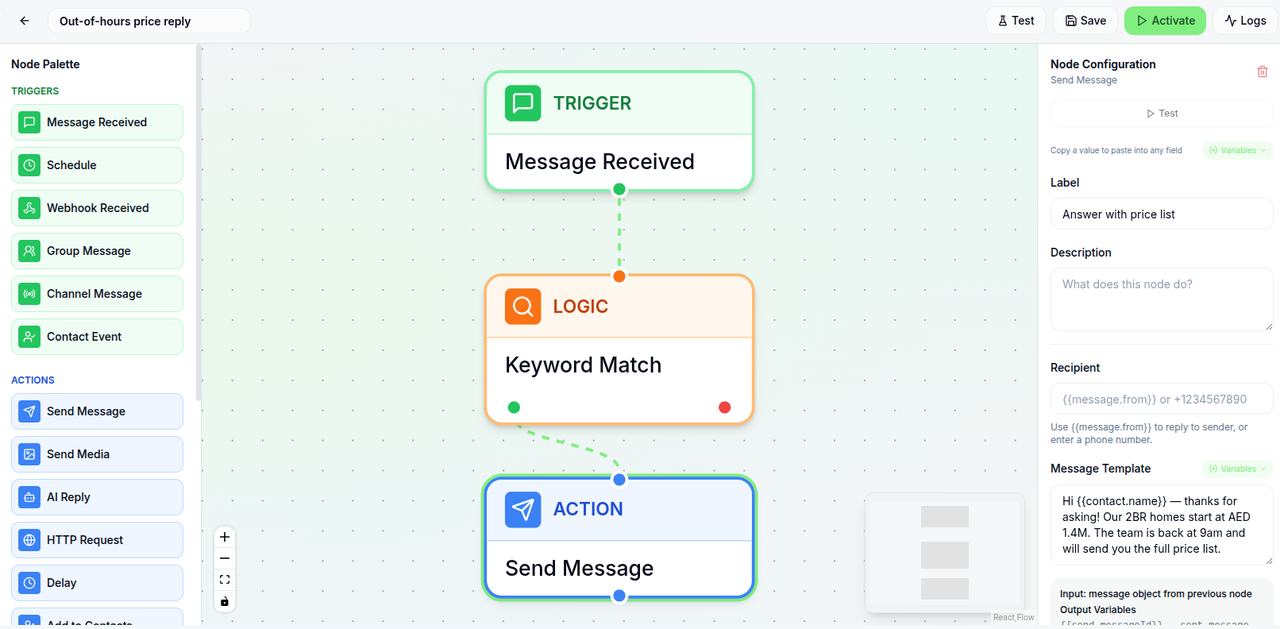
This is a real workflow, laid out the way the builder lays it out. Someone messages the word price at 21:40; the chain decides what happens next.
Message received
Any inbound message on the linked number.
“hi, whats the price for the 2br?”
Keyword matches “price”
Contains any of: price, pricing, cost, how much.
matched → true
Outside business hours
Branches on the time the message arrived.
21:40 → after hours
Send message
Answers immediately with the price list and sets expectations.
“Hi Layla — 2BR starts at AED 1.4M. The team replies from 9am.”
Tag contact + assign to human
Tags the contact “pricing enquiry” and puts the thread in the shared inbox for the morning.
assigned → Sales
Nobody was awake for any of that. The customer got a real answer in seconds, and a human picks up a conversation that is already labelled.
Build a WhatsApp chatbot without code
Every workflow is the same three-part sentence: when this happens, if this is true, do this. Blocks are dragged in and filled out; there is nothing to deploy.
Triggers — when it starts
- Message received
- Any inbound message on a linked number. The usual starting point.
- Keyword match
- Fires only when the text matches words you list — exact, contains, or starts-with.
- Schedule
- Runs at a time you set rather than waiting for a message.
- Webhook
- Something in your own system calls uni-msg and starts the chain.
- Contact event
- A contact is created or updated — useful for onboarding sequences.
- Group message
- A message in a group chat rather than a one-to-one thread.
Actions — what it does
- Send message
- Plain text, with merge fields from the contact record.
- Send media
- An image, document, or audio file.
- AI reply
- An LLM drafts the answer from your context. Bounded — see below.
- Delay
- Wait before the next step so a sequence does not arrive all at once.
- Tag / update contact
- Write back to the contact record, or add them to a group.
- HTTP request
- Call your own API — look up an order, write to a CRM.
- Forward message
- Pass the conversation on to another number.
- Check number
- Verify a number is on WhatsApp before trying to message it.
Between them: conditions
Keyword matching, field comparisons and a switch that routes down several branches at once — so one workflow can answer a price question, a delivery question and an out-of-hours message differently without becoming three workflows.
The limits that apply to every workflow
Automated messages share your number's reputation, so these are enforced account-wide rather than left to each workflow to respect.
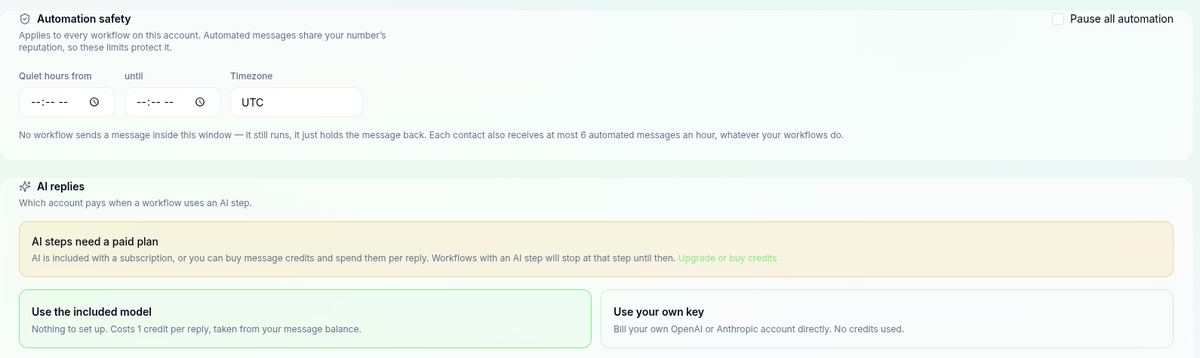
- Quiet hours. Set a window and no workflow sends inside it. The workflow still runs — the message is held back rather than lost.
- Six an hour, per contact. However many workflows you build, one person cannot receive more than six automated messages in an hour. This is the ceiling that stops a loop becoming a ban.
- One switch to stop everything. Pause all automation on the account without deleting or unpicking any workflow.
Where the AI starts and stops
The AI reply block drafts an answer from context you supply. It is a step inside a workflow, not the workflow itself — which is the difference between a bot that helps and one that confidently invents a delivery date.
What it is good for
- Answering the same question asked fifty different ways
- Drafting a reply a human approves before it sends
- Summarising a long thread before handover
Where to stop it
- Prices and dates that must be exact — look those up with an HTTP request
- Anything contractual, medical or financial
- A question it has already failed once — hand over instead
Two ways to pay for it, chosen per account: use the included model and each reply costs one message credit, or bring your own key and bill your OpenAI or Anthropic account directly, using no credits. A workflow that reaches an AI step without either simply stops there.
If you want an assistant that operates WhatsApp on your behalf rather than a rule that fires on a keyword, that is a different tool: the WhatsApp AI assistant.
Handover to a human
Automation earns trust by knowing when to stop. Any step can assign the conversation to a person, and it lands in the shared inbox with the whole exchange intact — what the customer asked, what the bot replied, and why it escalated.
Pricing
Start free to link a number and try the inbox. Workflow automation and AI replies are part of the Business plan.
Business
Automation$39 per month
- ✓3 numbers
- ✓Workflow automation
- ✓AI auto-replies
- ✓Priority support
Questions people actually ask
Can WhatsApp auto-reply without the Business API?+
Yes. Your number links to uni-msg as a companion device, the same mechanism WhatsApp Web uses, and workflows run against the messages that arrive there. There is no Meta Business verification, no template approval and no provider contract to sign.
Is a WhatsApp bot allowed?+
Replying automatically to people who messaged you first is ordinary use — it is the same conversation, answered faster. What gets numbers restricted is unsolicited outbound at volume. A workflow that only ever responds to an inbound message is on the safe side of that line by construction.
Does it work on my existing number?+
Yes, and that is usually the point. You keep the number your customers already message. Your chat history stays on your phone, and you carry on answering manually whenever you want to — a workflow can be paused without unlinking anything.
Can it reply outside business hours?+
Yes. A condition block can branch on the time a message arrived, so the same workflow answers one way during the day and another way at night. The common shape is an immediate acknowledgement after hours plus assignment to a human for the morning.
What happens if the AI cannot answer?+
It stops and hands over. The AI reply block is one step in a chain, so you decide what follows it: assign the conversation to a person, tag it for follow-up, or send a holding message. Nothing forces the bot to keep guessing at a question it cannot handle.
Do I need to write code?+
No. Workflows are built by dragging blocks and filling in fields. There is an HTTP request block for calling your own systems, which covers most of what people would otherwise script, and it is configured rather than programmed.
How fast does a reply go out?+
Effectively immediately for the first reply, because it is answering an inbound message rather than initiating a conversation. If a workflow sends several messages in sequence you can add a delay block so it reads like a person typing rather than a dump of text.
Is there a free plan?+
The free plan is 50 messages a month on one number with no credit card, which is enough to build a workflow and watch it fire on real conversations. Workflow automation and AI replies are part of the Business plan at 39 dollars a month.
Set up your first rule in minutes
Link the number you already use, pick a trigger, and let it answer the next message that arrives. Free to start, no credit card.
Start freeSending to a list instead? See the bulk WhatsApp sender